
Reliable WordPress Backup Plugin
Built for Real Websites, Not Just Demos
Automatically back up your WordPress website — including files, database,
plugins and themes — with complete control.
Download backups offline for free or store them securely in the cloud.
Built by hosting professionals who’ve managed 1,000+ live websites.
How to Use the OKRank WordPress Backup Plugin
This video walks you through the complete process —
from installing the WordPress backup plugin
to creating, downloading, and restoring backups.
No assumptions. No skipped steps.
Just a clear, practical guide based on the
actual plugin interface.
1. Install & Activate the Plugin
Upload and activate the OKRank WordPress Backup Plugin from your WordPress dashboard. Once activated, the backup manager appears directly inside your admin panel — no external tools required.
2. Choose What You Want to Back Up
Select between full website backup, database-only backup, files-only, plugins, or themes. This flexibility keeps backups lightweight and relevant to your needs.
3. Download Offline or Upload to Cloud
You can download backups instantly and store them offline for free, or upload them to secure cloud storage using an affordable yearly plan.
4. Restore When Something Goes Wrong
If your site breaks due to updates, hacking, or accidental deletion, restore your WordPress website using the stored backup — without complicated server steps.
This walkthrough reflects how the
WordPress backup plugin actually works
inside the WordPress dashboard —
no staged demos, no edited flows.
Our goal is simple:
make backups easy enough that
you actually use them.
Inside the OKRank WordPress Backup Plugin
A quick look at the real plugin interface — backup manager, cloud storage, scheduling and backup type selection — exactly as it appears inside WordPress.
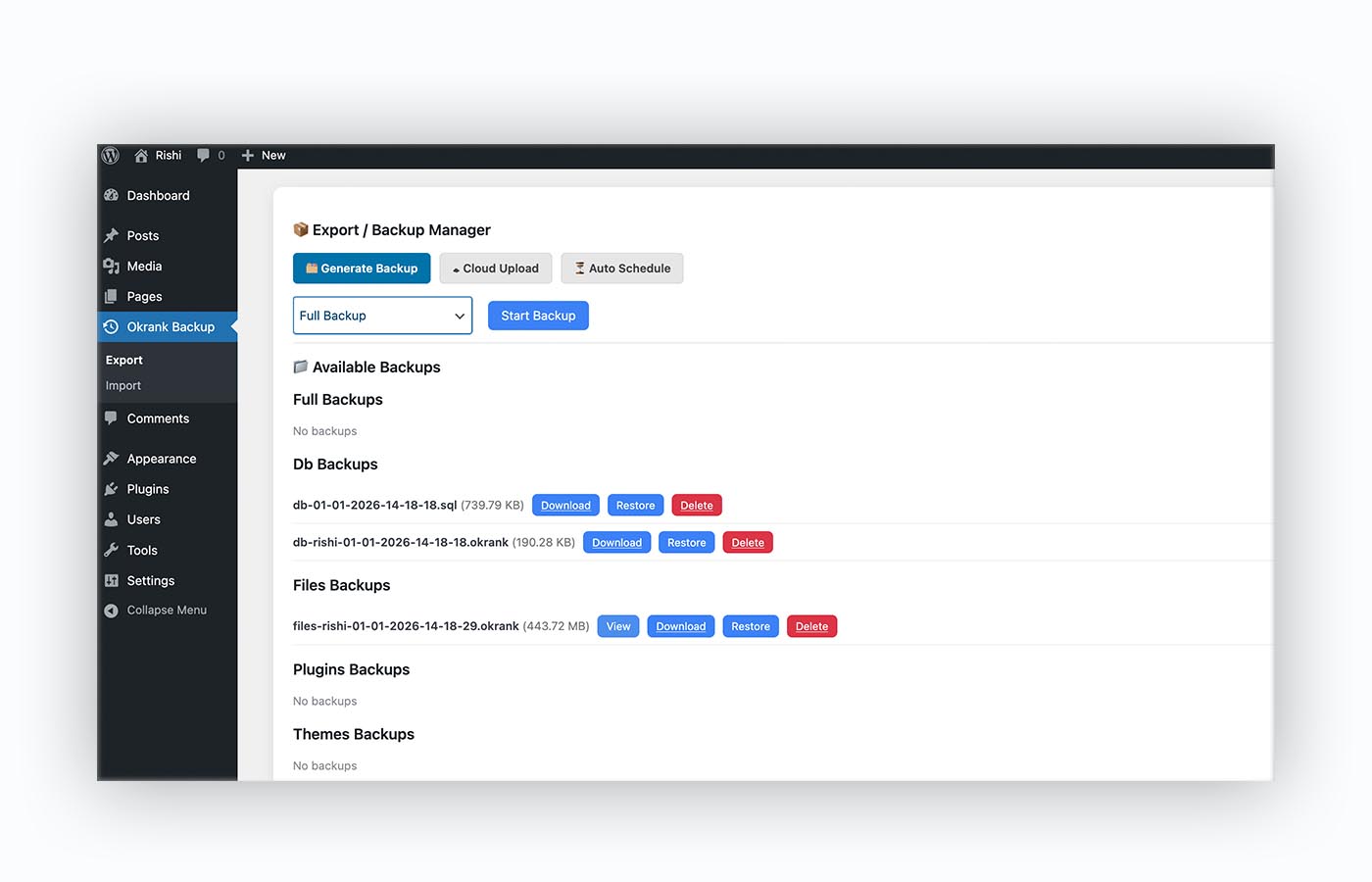
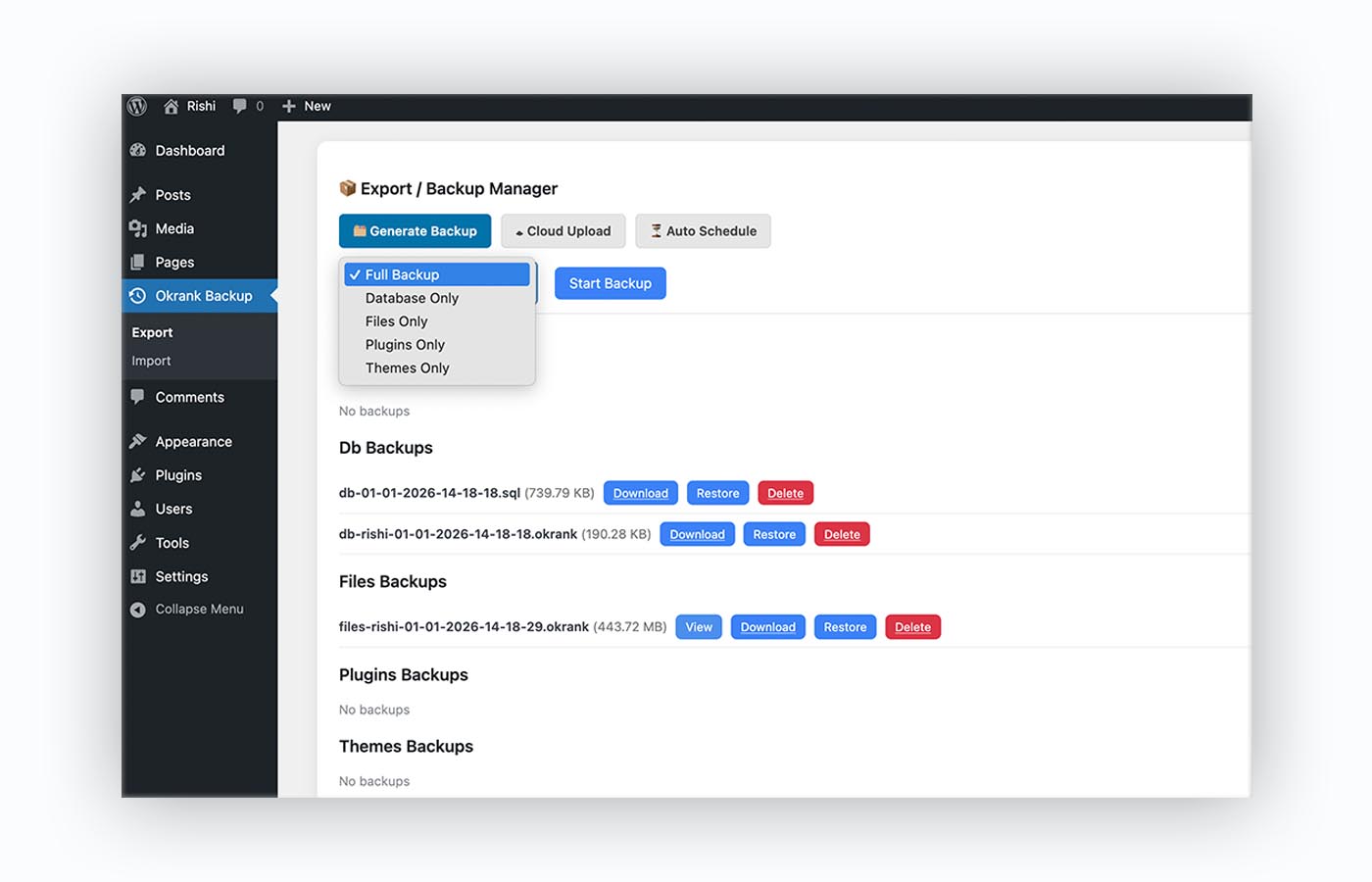
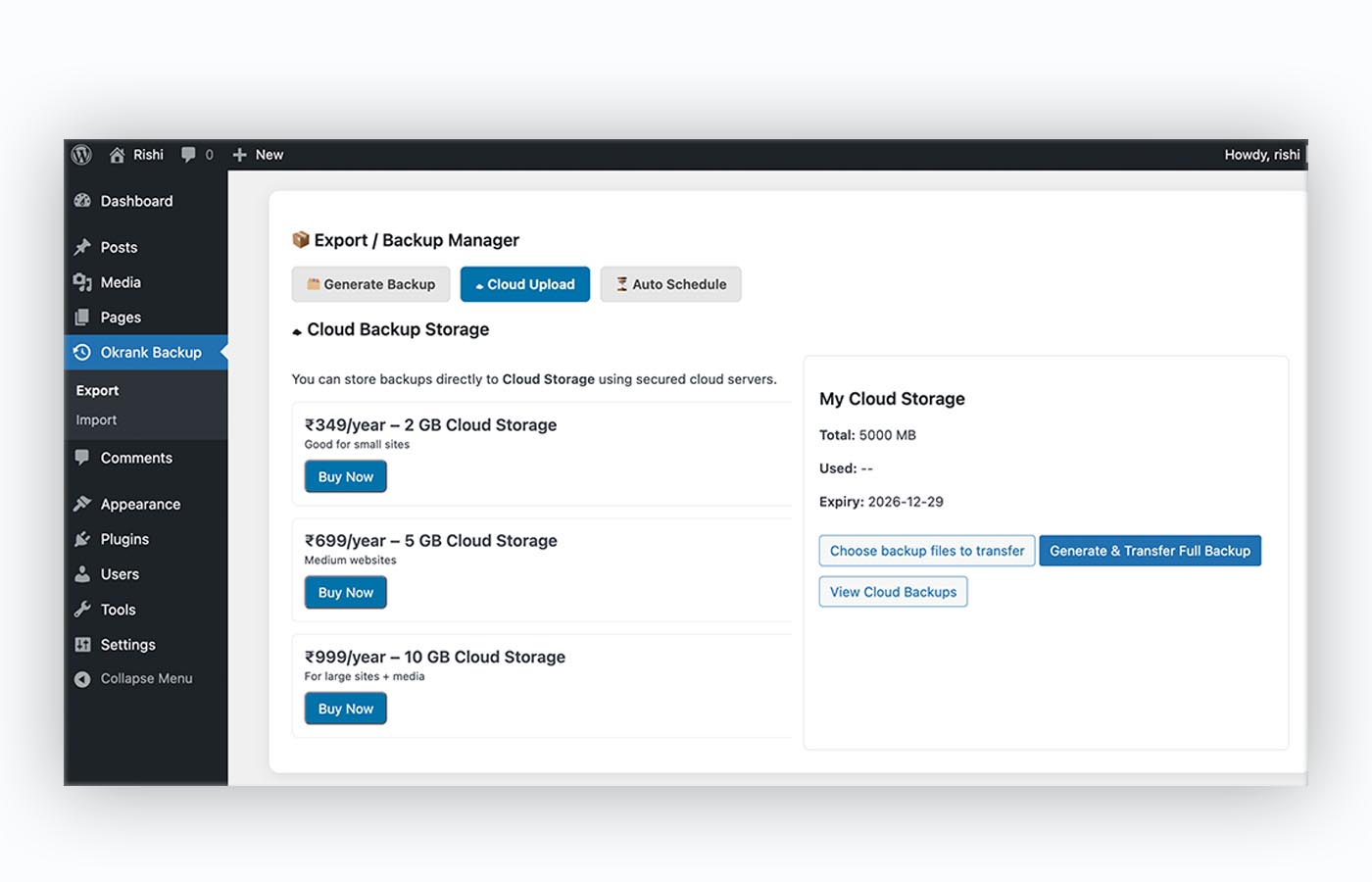
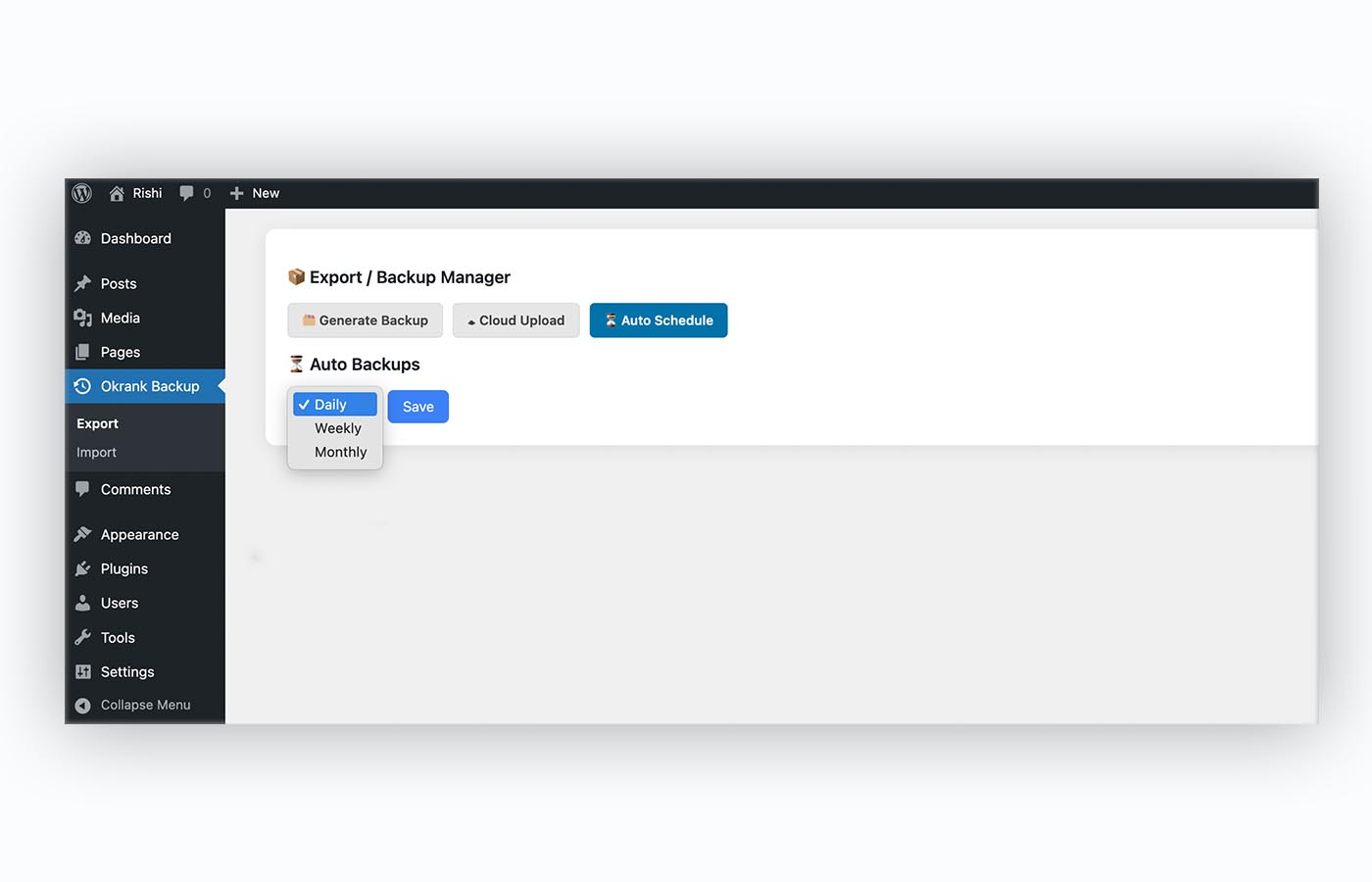
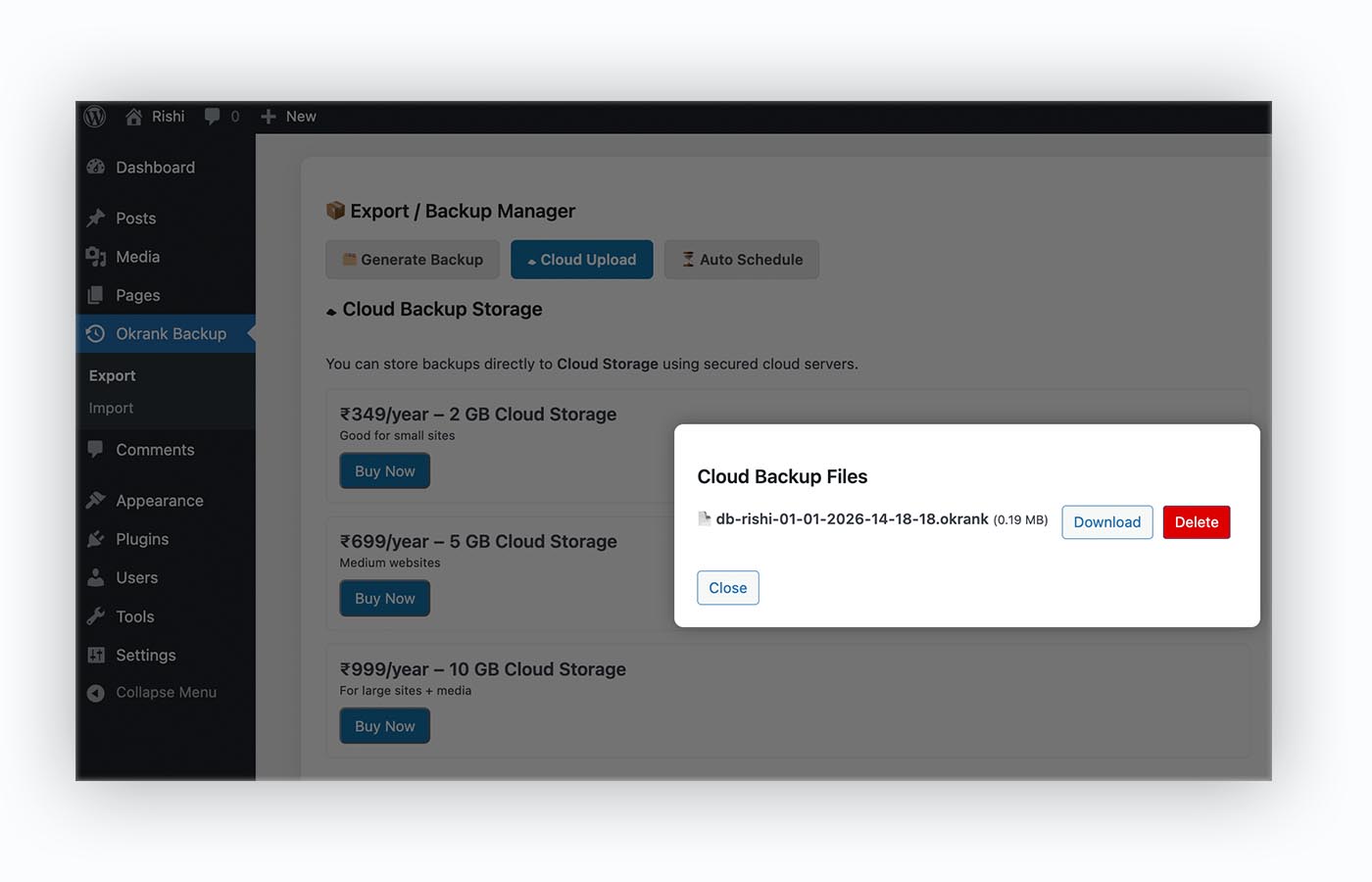
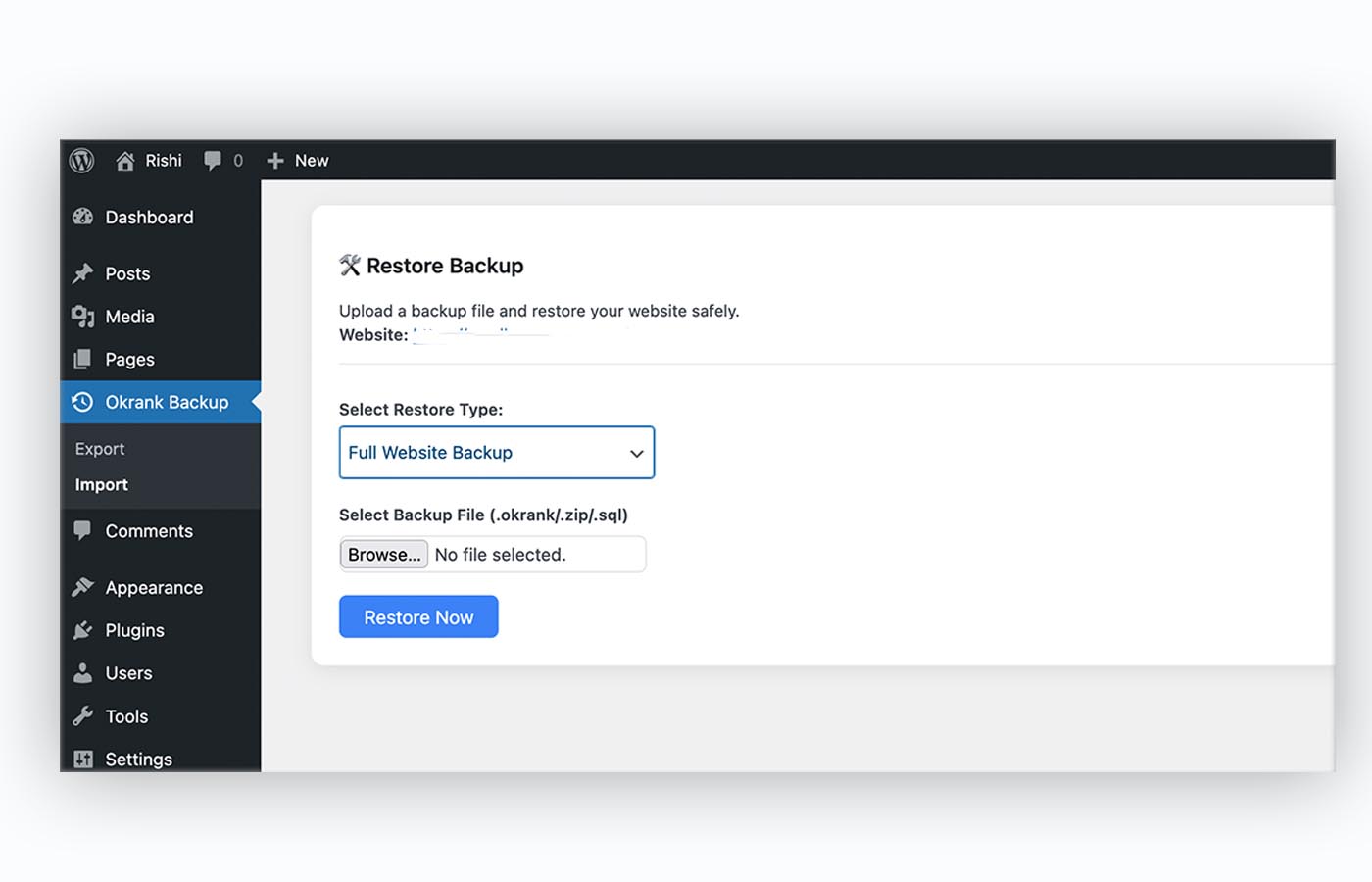
Screenshots shown above are from the actual working plugin. Layout adapts automatically across devices without cropping important interface details.
Why Most WordPress Backups Fail
Website data loss rarely happens because people ignore backups. It happens because backups fail silently, restore poorly, or aren’t accessible when something goes wrong.
Hosting Backups Stop Quietly
Many hosting backups fail without alerts. Users assume protection exists — until the backup is missing during a crash or server failure.
Forced & Expensive Cloud Storage
Most backup plugins bundle large cloud plans users don’t need — increasing costs without improving restore reliability.
Restore Fails When It Matters
During hacks or site crashes, complex restore processes delay recovery — sometimes making the backup useless.
No Ownership of Backup Files
Users can’t download, move, or store backups independently — leaving full control in someone else’s system.
A reliable WordPress backup system must give you visibility, control, and fast recovery — not assumptions.
A Simple & Honest Backup Approach
We built OKRank Backup around one clear belief — your website data should always remain accessible, portable, and under your control. No forced upgrades. No hidden restrictions.
Free Offline Backups
Download complete backups anytime and store them on your own system, external drives, or private servers. Your backups never expire and never depend on us staying online.
Affordable Cloud Backup
Use cloud storage only when it actually helps you. Pricing is simple and predictable — you pay only for storage, not for restores, downloads, or backup frequency.
Smart Automation
Schedule backups daily, weekly, or monthly — optimized to run smoothly without overloading your server or slowing down your website.
This approach keeps backups boring, predictable, and reliable — exactly how website protection should be.
Everything You Expect From a Modern WordPress Backup Plugin
OKRank Backup is built for real WordPress websites — not artificial limits or forced upgrades. You decide what to back up, where to store it, and how to restore it.
Full Website Backup (.okrank)
Create complete website backups — files and database combined — saved in a secure .okrank backup format designed for reliable restores.
Database-Only Backups
Take quick database backups without touching files — ideal for content edits, migrations, and safe rollbacks.
Files, Plugins & Themes Backup
Back up only what you need — WordPress files, plugins, or themes — keeping backups lean without losing flexibility.
Unlimited Local Backup & Restore
No size limits. Download and restore backups of any size — no hidden caps, even when using the free version.
Automatic Backup Scheduling
Schedule backups daily, weekly, or monthly — so your site stays protected even when you forget about it.
Optional Cloud Storage
Use cloud storage only when you want. We charge only for storage — not for backups, restores, or usage frequency.
OKRank Backup runs without restrictions — unlimited local backups, unlimited restores, and full ownership of your data — with cloud storage as a choice, not a dependency.
How OKRank Backup Works
Backups shouldn’t feel technical or risky. OKRank Backup follows a clear, step-by-step flow so your website is protected without complexity.
Install the Plugin
Install OKRank Backup like any WordPress plugin — no server access, no complicated setup, no hosting dependency.
Choose Backup Type
Select exactly what you want to back up — full website, database only, files, plugins, or themes — nothing extra.
Store Locally or in Cloud
Download backups instantly to your system or upload them to secure cloud storage — cloud is optional, control is always yours.
Restore Anytime
Restore backups of any size, anytime — even during hacks, crashes, or failed updates — without restrictions.
No hidden limits.
No restore caps.
No forced cloud plans.
Just a
clear backup workflow
built for real WordPress websites.
Protect Your Website With a Backup You Control
Whether it’s a hack, update failure, or accidental deletion — your WordPress website deserves a backup that actually works.
Download Available (5 Feb 2026)Compatible with standard WordPress hosting environments
Simple & Transparent Cloud Backup Plans
Local backups are always free. Cloud storage is optional — choose only what you need, upgrade anytime, and pay yearly with no hidden limits.
Starter
₹349
per year · 2 GB storage
- ✔ Secure cloud storage (2 GB)
- ✔ Unlimited backups & restores
- ✔ Any backup size supported
- ✔ Auto scheduled backups
- ✔ Full .okrank restore support
Professional
₹699
per year · 5 GB storage
- ✔ Secure cloud storage (5 GB)
- ✔ Unlimited backups & restores
- ✔ No file size restrictions
- ✔ Auto daily / weekly schedules
- ✔ Priority cloud transfer speed
Advanced
₹999
per year · 10 GB storage
- ✔ Secure cloud storage (10 GB)
- ✔ Unlimited backups & restores
- ✔ Large websites & media support
- ✔ Frequent automated backups
- ✔ Full restore flexibility
Cloud pricing applies only to storage. Local backups, restores, downloads, and plugin usage remain unlimited across all plans.
Frequently Asked WordPress Backup Questions
Honest, experience-driven answers about WordPress backups, restores, backup limits, cloud storage, file ownership, automation, and what actually goes wrong when websites lose data.
Q. What is a WordPress backup plugin, and why is it absolutely necessary?
A WordPress backup plugin is a system that creates a copy of your website’s critical data — including files, database, plugins, and themes — so the site can be restored if something goes wrong. This includes hacking incidents, failed updates, server crashes, accidental deletions, or hosting-level failures.
Many website owners assume their hosting provider automatically protects them. In reality, hosting backups often fail silently, overwrite older versions, or are unavailable when the server itself goes down. When backups are stored on the same server that crashes, recovery becomes impossible.
A dedicated WordPress backup plugin ensures that backups are created independently, stored where you control them, and restorable without relying on your hosting company.
Without a reliable WordPress backup system, a single mistake or attack can permanently erase months or years of work.
Q. What types of backups can I create using OKRank Backup?
OKRank Backup is designed to give granular control instead of forcing one-size-fits-all backups. You can create different types of backups depending on your need at that moment.
Supported backup types include: full website backup (files + database), database-only backup, files-only backup, plugins-only backup, and themes-only backup.
This flexibility is important because not every situation requires a full website backup. For example, content updates may only need a database backup, while plugin updates may only require plugin files.
Full website backups are stored in the proprietary .okrank format, optimized for faster and safer restores without file conflicts.
Q. What is the .okrank backup file, and why does it matter?
The .okrank file is a structured backup archive created specifically for complete WordPress restores. Unlike raw ZIP files, it maintains proper relationships between database data, files, plugins, and themes.
Many backup plugins create loosely packed archives that break during restore — missing database references, broken URLs, or corrupted plugin states.
The .okrank format ensures: consistent restore order, integrity validation, and compatibility even for large websites.
This becomes especially important for sites with large media libraries, WooCommerce data, or custom plugin setups.
Q. Are there any size limits on backups or restores?
No. OKRank Backup does not impose artificial file size limits on local backups or restores. You can back up and restore websites of any size, including multi-gigabyte installations.
Many WordPress backup plugins restrict restore sizes to 256MB, 500MB, or 1GB — even if they allow larger downloads. This makes the backup useless during real emergencies.
With OKRank Backup, if your server can handle the restore, the plugin will not block it. There are no restore paywalls or forced upgrades.
The only paid component is optional cloud storage — not backup creation, restore, or usage.
Q. Can I download and store backups offline?
Yes. Offline backups are fully supported and completely free. You can download backup files and store them on your local computer, external drives, private servers, or any storage you trust.
Offline backups are critical because they remain accessible even if your website, server, or hosting account becomes unavailable.
OKRank Backup does not lock you into cloud storage or restrict access to your own data. Your backups belong to you.
Q. How does cloud backup work in OKRank Backup?
Cloud backup is optional and storage-based. You only pay for the amount of cloud storage you choose — not for backup frequency, restores, or downloads.
Cloud backups are useful for off-site protection, especially if your local system fails or if multiple team members need access.
Unlike many plugins, cloud storage is not forced. You can combine offline backups with cloud backups depending on your risk tolerance.
Q. Does OKRank Backup support automatic scheduled backups?
Yes. You can schedule backups daily, weekly, or monthly. Automated backups ensure protection even when you forget or when team members miss manual steps.
Scheduling is optimized to reduce server load and avoid performance spikes during peak traffic.
Automatic backups can be combined with local storage, cloud storage, or both.
Q. Can I restore a backup to a different server or hosting provider?
Yes. Backups created with OKRank Backup can be restored on different servers, different hosting providers, or fresh WordPress installations.
This makes the plugin suitable for migrations, hosting changes, and disaster recovery.
The .okrank format ensures restores are consistent even across environments.
Q. Why do many WordPress backups fail during restore?
Backup failures usually happen during restore — not during backup creation. Common reasons include server memory limits, file size restrictions, incorrect restore order, or missing database relationships.
Some plugins intentionally restrict restore size to force paid upgrades. Others rely on fragile ZIP extraction methods.
OKRank Backup focuses on restore reliability first — because a backup that cannot be restored is not a backup at all.
Q. Is OKRank Backup suitable for large or business websites?
Yes. OKRank Backup was built from real hosting experience dealing with large WordPress websites, media-heavy projects, and high-traffic environments.
The plugin does not artificially restrict usage and supports scalable backup strategies.
Businesses retain full ownership of their backups, ensuring long-term data safety.